job: form-entry · on demand

Automate data entry into web forms

Hand dassi the rows. It types each one into the web form, submits it, reads the confirmation back, and moves to the next. When the form rejects a value, dassi stops on that row and tells you why in the form's own words. It doesn't guess a fix.

Give dassi this job

Free credits, good for 7 days — no card required

Trusted by 30,000+ Chrome users Rated 4.8/5 on Chrome Web Store Works with Claude, GPT, Gemini, and more

One run, start to finish

Every dassi job has the same shape: an input, work done on real pages and accounts, output you can verify, and exceptions flagged — never guessed. This one is a recorded run, shown as it happened.

run · form-entry · a60c0c12 on demand · Sep 19, 2026 · 3 min 11 s recorded run
input

“Enter these 3 rows into the practice form. Submit each one, read the confirmation, close it. If a value is invalid, stop on that row and don't invent a correction.”

3 spreadsheet rows · fictional data

run
  1. demoqa.com row 1, Maya Okafor: filled name, email, gender, mobile, date of birth, subject, hobby, address, state, and city; submitted; read the confirmation; closed it
  2. demoqa.com row 2, Daniel Reyes: same ten fields, submitted, read the confirmation, closed it
  3. demoqa.com row 3, Lena Fischer: the form rejected the email and the mobile number; stopped and left the row unsubmitted
output
  • verified: Row 1 submitted. Confirmation read back: Maya Okafor · maya.okafor@example.com · 5550142201 · 14 March,1991
  • verified: Row 2 submitted. Confirmation read back: Daniel Reyes · d.reyes@example.com · 5550188342 · 02 November,1987
exceptions
  • flagged: Row 3 email “lena.fischer@example” has no top-level domain. The form said: “Please match the requested format.”
  • flagged: Row 3 mobile “555019” is 6 digits and the form needs 10. The form said: “Please lengthen this text to 10 characters or more (you are currently using 6 characters).”
  • flagged: No correction invented. Row 3 was left unsubmitted for you to fix at the source
next

Saved as a workflow, the next batch of rows runs the same way. Rows that go through get their confirmation read back; rows the form rejects come back to you with the reason.

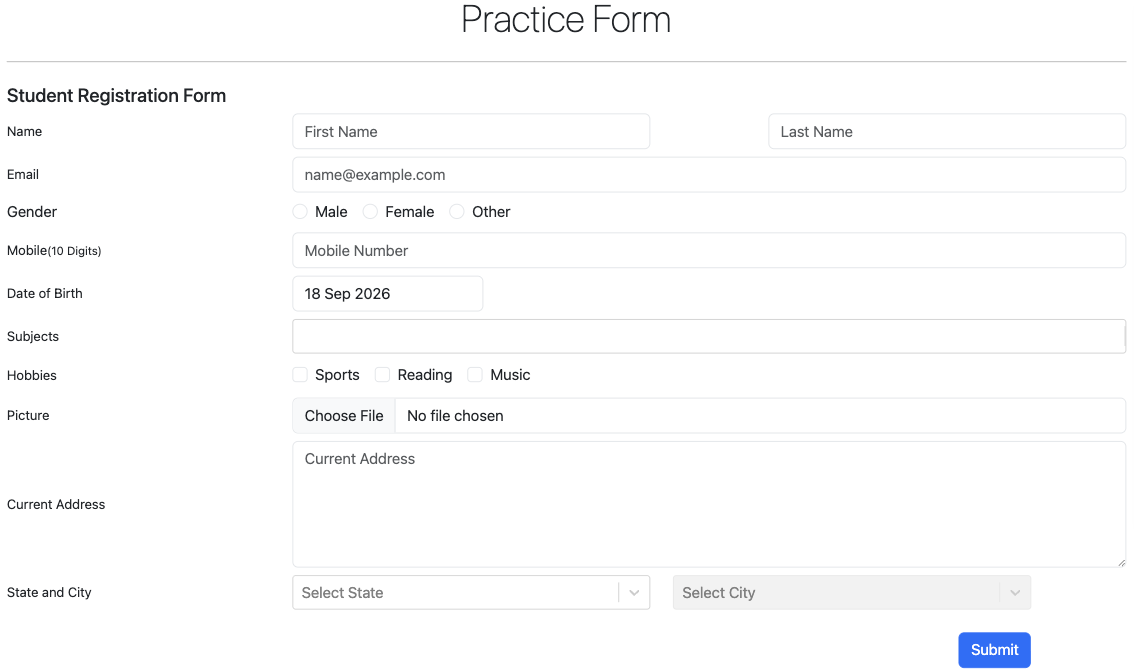
DEMOQA's public practice form, headed Student Registration Form, with empty fields for first and last name, email, gender, a 10-digit mobile number, date of birth, subjects, hobbies, picture upload, current address, and state and city, above a Submit button
The public practice form used for the run (fictional data).

What you can hand off

Rows into forms that have no import

Supplier portals that take one order at a time, benefits and insurance portals, the admin screen of a tool with no CSV upload. dassi types the rows in the way you would.

Confirmation checked on every row

After each submit, dassi reads the confirmation page or message back, so you know which rows went in and what the form recorded.

Bad rows stopped, not patched

When the form rejects a value, dassi stops on that row and quotes the form's message. A guessed domain or a padded phone number never goes in on your behalf.

Date pickers, dropdowns, and dependent fields

The recorded run filled a date picker, a subject field, hobby checkboxes, and a city dropdown that stays locked until a state is chosen.

Forms behind your login

dassi works in the session you're signed into. If a portal asks you to sign in, it uses what Chrome's password manager fills, and two-factor prompts come to you.

Two rows in, one stopped

We gave dassi three rows, a public practice form, and the one rule we care about more than speed: if a value is invalid, stop on that row and don’t invent a correction.

The first two rows were clean. dassi filled in all ten values for Maya Okafor, submitted, read the confirmation back (her name, her email, 5550142201, 14 March 1991), closed it, and did the same for Daniel Reyes. Then it got to Lena Fischer, whose email was “lena.fischer@example” with no top-level domain, and whose mobile number was “555019”, six digits in a field that wants ten.

The form refused both. dassi didn’t add “.com”, and it didn’t pad the number. It left the row unsubmitted and reported the two problems in the form’s own words: “Please match the requested format.” and “Please lengthen this text to 10 characters or more (you are currently using 6 characters).”

That matters more on row 140 of a long afternoon than on row 3 of a demo. A plausible fix sails through validation and becomes a bounced email weeks later, when nobody remembers where the address came from.

What we actually ran

A recorded run on September 19, 2026, from a test browser profile, against DEMOQA’s automation practice form, a public page that exists so people can test form tools on it. All three rows were fictional: made-up names, example.com addresses, 555 numbers. The whole thing took 3 minutes 11 seconds.

The form is a decent stand-in for the ones people complain about. Some of the ten values go into awkward controls, like a date picker, a subject box you type into and then pick from, hobby checkboxes, and a city dropdown that stays greyed out until you choose a state. We’d have liked to test the file upload too (the form has one), but our rows didn’t include pictures.

One thing this run can’t show you. A value that’s wrong but valid, say an email with a typo in the name part, passes the form’s check, and we doubt dassi would catch it either, since nothing on the page says it’s wrong. That one is still on whoever typed the spreadsheet.

Where this shows up in real work

A lot of the data entry still done by hand survives because the destination has no import (a supplier portal that takes one order at a time, a benefits portal, the admin screen of an internal tool nobody is going to rebuild), so the rows sit in a spreadsheet and someone copies them across field by field.

dassi does that copying in your browser, signed in as you. If the portal wants a login, it uses your current session or whatever Chrome’s password manager fills in. You never paste a password into a chat or into dassi’s settings, and two-factor prompts and CAPTCHAs come to you.

How much it does without asking is up to you. Mark submitting as something you approve and it waits before each one. Take that off once the column mapping has proved itself, and read the summary at the end instead, which here would have said two rows went in and one needs you.

Teaching it a new form

The first time, you say which column goes into which field and what to do with bad data. Save that as a workflow, and next week’s batch means pointing dassi at the new rows. Lena Fischer, for the record, never got submitted. She doesn’t exist, so she won’t mind.

Teach it once

01

Map columns to fields

Tell dassi which column goes where, in plain English. Column C is the mobile number, D is date of birth, and so on. It asks when a field has no obvious match.

02

Write the stop rule

Ours was one sentence: if a value is invalid, stop on that row and don't invent a correction. You can make it stricter, like stopping on any empty required field.

03

Choose where it pauses

Flag submitting as an action you approve and dassi waits before each one. Once you trust the mapping, you can take the flag off and just read the summary.

Your accounts. Your machine. Your call.

Runs on your machine

The agent works in your browser on your computer, local by design. It never runs in our cloud.

Your logins stay yours

It works in the sessions you're already signed into. No password handoff, no credential vault.

You approve what leaves

Messages, submissions, payments — anything outbound waits for the approvals you set.

Your model, your choice

Claude, GPT or Gemini with your own key or included credits, or a fully local model. On your own key, prompts go straight to your provider; included credits pass through dassi's relay.

Frequently asked questions

What happens when a row has bad data?

dassi stops on that row, leaves it unsubmitted, and reports the form's own validation message. In the recorded run, row 3 had an email with no top-level domain and a 6-digit mobile number, and dassi quoted both errors instead of guessing corrections.

Can it read rows straight from Google Sheets?

Yes. It reads the sheet you have open in your browser, signed in as you, so there's nothing to export and no connector to set up. Pasting the rows into dassi works too.

Is this an AI form filler for any website?

For forms you can open in your browser, yes, including ones behind your login. It reads the form each time it runs, so a field that moved or got renamed is less likely to break things than it would with a script tied to fixed positions.

Will it submit without asking me?

Only if you let it. Mark submitting as an action you approve and dassi pauses before every submit. We'd keep that on for the first batch or two.

What about CAPTCHAs?

dassi stops and hands them to you. It doesn't try to get around CAPTCHAs or rate limits, and a form that throws one on every submit probably isn't meant for batch entry.

Was the data in the recorded run real?

No. All three rows were fictional, with example.com email addresses and 555 phone numbers, and the form is a public practice form built for testing form tools.

Give dassi its first run

Install dassi, open the pages this job lives in, and show it the work once. It runs from then on — your way, on your machine.

Add dassi to your browser

Free credits, good for 7 days — no card required

More jobs dassi runs

Sign up — get 10% off

Create your dassi account. We'll email your discount code + the desktop install link.

or